


Alarm Monitoring, Explained: What Actually Happens After Your Alarm Goes Off
What “monitored” really means, the three ways it is done today, and how to tell which one you are actually paying for.
Dallas Alarm Systems Team
What Does “Monitored” Actually Mean?
It is 2:14 a.m. A motion sensor trips inside your warehouse off Stemmons Freeway. The siren sounds to an empty building and an empty lot. The real question is not whether the alarm went off. It is whether anyone is on the other end of that signal, and what they are able to do about it.
That single point is where most of the confusion starts. At Dallas Alarm Systems, the question we hear more than any other is some version of “my building already has an alarm, so I am covered, right?” Sometimes the answer is yes. Often it is no, because having an alarm and having it monitored are two different things. An alarm on its own depends on a person being close enough to hear it and willing to act. A monitored system sends that trip out of the building to a staffed monitoring center whose job is to confirm it and respond, whatever the hour.
Before comparing monitoring plans, it helps to understand three things:
- Unmonitored: the alarm only sounds on site, so response depends entirely on who happens to be in earshot.
- Monitored: the trip travels to a monitoring center where a trained operator picks it up and acts on the plan for your building.
- Reporting path: how that signal actually leaves the building, which is the part most owners never ask about and the part that fails most often.
How Traditional Central-Station Monitoring Works
This is the model most businesses already recognize, and it still does real work every night. When a zone trips, the panel reports to a central station, and a live operator sees the alarm and follows the plan on file for your building. For a lot of commercial properties, a professionally monitored commercial alarm system is the right foundation to build on.
The mechanics underneath it are worth understanding, because this is where quality varies the most:
- The panel speaks in signals, not sentences: it sends a coded report, usually in Contact ID or SIA format, telling the operator which zone or point tripped, so a front-door contact reads differently from a rear warehouse motion sensor.
- Supervision is the quiet safeguard: a properly set up panel checks in with the central station on a schedule, so if the reporting path goes dead, the station sees a supervisory alert instead of silence.
- UL-listed is the standard that counts: a UL-listed central station is held to real staffing, backup-power, and response requirements, and a surprising amount of “monitoring” is not.
One thing we notice during takeovers:
What Video-Verified Monitoring Adds
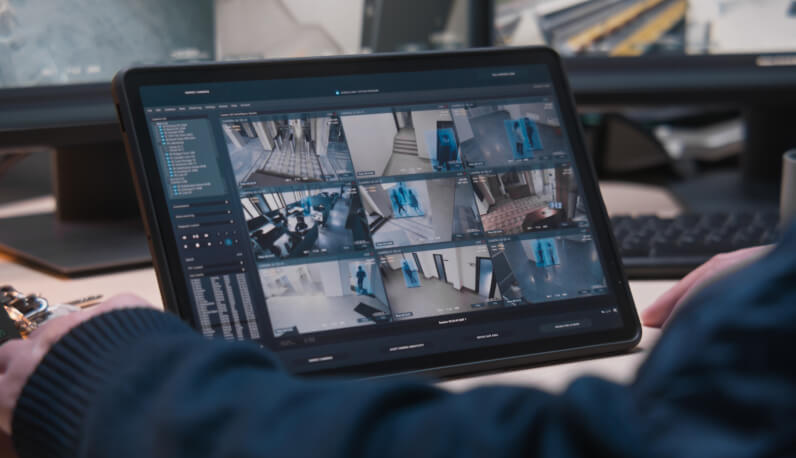
Video-verified alarm monitoring answers the question traditional monitoring cannot. Instead of guessing, the operator pulls a short clip from the moment the alarm tripped and sees the cause before anyone is dispatched.
That one change reshapes both your response and your costs. A person moving through a loading dock looks nothing like a maintenance crew that came in early or heat rolling off a rooftop unit, and once an operator can confirm a real intruder, the alarm is handled as the real thing it is:
- A verified alarm carries more weight: many law-enforcement agencies give higher priority to verified alarms where local policy allows, so a confirmed person on site is treated differently from one more unconfirmed trip.
- False dispatches drop, and so do the fines: catching the after-hours cleaner or an animal crossing the lot on camera means you are not paying for a squad car that was never needed.
- You keep the evidence: the clip is stored, so a break-in leaves you with usable footage instead of a guess about what set the system off.
Why More Commercial Properties Are Adding Remote Video Monitoring
The newest layer is not about replacing operators. It is about pointing them at the right thing faster, and putting eyes on places a fixed alarm never covered. For open lots, trailer yards, and after-hours exteriors, remote video monitoring has become one of the more useful tools on the commercial side, and the industry has moved quickly here.
Picture a distribution yard in Garland after the last shift clocks out. The building alarm is armed, but the trailers, the fence line, and the dock apron all sit outside it. That is exactly the gap AI-assisted monitoring is meant to close, and it works in layers:
- Analytics do the first pass: the software classifies what it sees and separates a person crossing a line from headlights, rain, or a stray dog, so the operator is not buried in nuisance alerts.
- Talk-down changes behavior on the spot: an operator can speak through a site speaker the moment someone is spotted, and most people who hear a live voice call out their location leave before anything is taken.
- Virtual guard tours cover the in-between: scheduled camera sweeps of a yard or construction lot catch trouble between the fixed alarm points, which is often where after-hours theft actually starts.
How Do You Tell What You Are Actually Paying For?
- Whether the center is UL-listed, and where it sits: you want a real standard and staffed redundancy, not one desk in one location.
- Whether the panel reports dual-path: if it leans on a single line with no cellular backup, one interrupted cable is all it takes to go silent.
- Whether it is traditional or video-verified: this single choice drives both your police response and your false-alarm exposure.
- What the escalation actually looks like overnight: you are paying for the steps after the alert, so have someone spell out who calls whom, and in what order.
- Whether you own the equipment: ownership decides how freely you can change providers later without tearing the system out of the walls.
A situation we see surprisingly often:
Do You Really Need Professional Monitoring, or Is Self-Monitoring Enough?
Plenty of app-based systems now let you watch your own business from your phone, and for a very small operation with someone always reachable, that can be enough. For most commercial properties it leaves a real hole, and it is worth being honest about why.
Self-monitoring puts you in the response seat. The alert lands on your phone, and if you are asleep, on a plane, or simply not looking, the alarm goes unanswered and turns back into noise. Professional monitoring hands that job to a center that is staffed around the clock, including overnight hours and holiday weekends, when many commercial burglaries occur. The real service is not the notification. It is the escalation behind it, the operator working your call list and coordinating with police while you are still reaching for your keys.
The honest rule of thumb we give owners across Dallas and Fort Worth: if losing what is inside the building for one night would genuinely hurt the business, self-monitoring by itself is not enough to lean on.


