
Commercial Access Control Beyond the Keycard: What Is New, and What Is Worth Adding

Access control has advanced in a few real ways over the last few years. Here is what is new, what it is good for, and how to tell which parts are worth it for your building.

Published July 15, 2026

Dallas Alarm Systems Team

What Has Changed, and What Has Not

Plenty of businesses still run on keys and swipe cards, and for a lot of buildings that is perfectly fine. The technology behind access control has advanced in a few real ways over the last few years, though, and some of those changes are worth knowing about before your next upgrade or a new project.

A few things have changed. The keycard is slowly giving way to the phone. More systems are managed online instead of from a computer in a back closet. And a few are getting smarter about when they open a door at all. None of this means what you have now is wrong. It means you have more choices than you did last time around, and some of them solve problems that keys and older cards never could.

At Dallas Alarm Systems, a good part of the commercial access control work we do is helping owners figure out which of these make sense for their building and which they can skip. What follows is a plain look at where things stand.
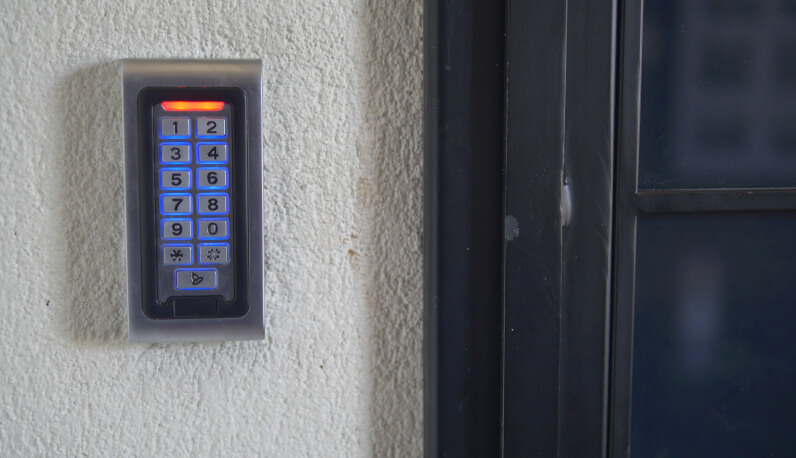
Keypad access control reader mounted beside a commercial glass door

What a Modern Access Control System Is Made Of

Whatever the brand on the box, most commercial systems are built from the same few parts, working together every time someone opens a door. The reader checks the credential, the controller decides whether that person is allowed in at that moment, and the lock does what it is told. Knowing these pieces makes it easier to understand a quote, see where the money is going, and tell a complete system from a single smart lock sold as one. It also helps later, because most upgrades come down to improving one of these parts rather than tearing everything out.
  • A controller, the part that decides whether a door unlocks
  • A reader at each door that picks up the card, fob, or phone
  • The credential, meaning whatever a person uses to get in
  • The lock itself, usually an electric strike or a magnetic lock
  • A request-to-exit sensor and a door contact, so the system knows when a door is opened and whether it closed again.
None of that is new. What has changed is how smart each part has become, and the credential is where most of it starts. One older piece still trips people up, though, and it is worth settling before anything else.

A call we make on every install:

whether each door should stay locked or release when the power goes out, what installers call fail secure and fail safe. A back storeroom can stay locked through an outage, but a main exit tied into the fire system has to release so people can get out. We still find buildings set the same way on every door, and that one setting is either a safety problem or a way in that nobody meant to leave.

From Keys and Old Cards to Smart Cards

The oldest part of most systems is also the weakest. A metal key keeps no record and can be copied at any hardware store. The older plastic proximity cards are better than keys, but the common low-frequency kind can be copied with a cheap handheld device, so for a business holding cash, inventory, or records, it is time to move beyond them. What we usually see is a building still running those low-frequency cards from an install years ago, with no idea they can be copied in the parking lot.

Smart cards fix that. They use encrypted communication between the card and the reader, which makes them far harder to clone than the older low-frequency ones. To your staff they look and feel like the old cards, so nothing changes at the door except better protection behind it. For most new setups, they are a sensible place to start.

Mobile Access, When the Phone Becomes the Badge

The bigger change is skipping the card and using a phone instead. With mobile access, the credential lives on the phone and opens the door over Bluetooth or a quick tap, the same kind of short-range signal your phone already uses to pay at a register. The appeal is mostly practical. There are no cards to print, a new hire can be set up before their first day, and when someone leaves you switch their access off with no badge to track down. The change we see land best is at offboarding, when a manager can cut access in seconds instead of hoping a badge finds its way back.

There is a security side too. A phone stays locked behind a passcode or a fingerprint and rarely gets left lying around, unlike a card in an open drawer. Most businesses still keep a few spare cards for visitors, but for regular staff the phone is becoming the normal way in.

Touchless Entry, and Why It Caught On

Touchless access got popular when people stopped wanting to touch shared door handles, and it stayed because it is just easier. A wave-to-open reader, or a phone that can unlock the door without pulling out a physical card, means someone carrying boxes into the loading dock does not have to fumble for one. It runs on the same mobile and smart-card technology underneath, set to read the credential from a few inches or a few feet away instead of pressed against the reader.

Cloud-Managed or On-Premise: Managing Access From Anywhere, or Keeping It In-House

Another choice is where the system is managed. An on-premise setup keeps everything on a computer inside your building, which some businesses prefer, especially where the internet is unreliable. Cloud-managed access moves that to a website you log into, so adding a person, changing the hours a door unlocks, or checking who came in last night can be done from a laptop or your phone instead of a drive to the site. Even when the internet goes down, the doors normally keep working, since each controller already holds its permissions and keeps making decisions until the connection comes back.

This matters most when you have more than one location. One mistake we see often with several sites is a different access control system at each location, which leaves no single place to check what happened when something goes wrong. Cloud access brings them under one login. If you run more than one site around Dallas, one person can manage every door and pull reports from anywhere, which is usually where the cloud makes the most sense.

Putting the Doors on a Schedule

One feature almost every business ends up using is scheduling. Instead of someone unlocking the front door by hand each morning, the system opens it at opening time, locks it again after hours, and keeps the sensitive rooms restricted around the clock. It sounds small, but it takes a real amount of daily fuss off your plate, and it closes the gap left the night someone forgets to lock up. It is often the part owners tell us they did not expect to lean on as much as they do.

Why Access Decisions Are Getting Smarter

The newest change is in how the system decides. An older system really asks one thing, does this badge work. Some of the larger enterprise access platforms are starting to borrow ideas from an IT security approach called zero-trust, and weigh a bit more before they open, like whether the request matches the person’s role, the location, the time, or whether a second form of authentication is needed. In plain terms, the same card that opens the front door on a Tuesday morning might be held or sent for a second check at the server room door at two in the morning. This is still mostly an enterprise feature rather than something every new system does, but it is the direction the higher end is heading.

This is also where access control stops working on its own. Tied into your alarm system and security cameras, a door opened after hours can set off the alarm and bring up the matching video at the same time, so you are not left guessing from a line in a log.

Thinking About Updating Your Access Control?

If you are weighing whether to move off keys, add mobile access, or bring a few locations onto one system, we are happy to talk it through. Dallas Alarm Systems works with businesses across Dallas, Fort Worth, Frisco, Richardson, and the wider metro, and we can walk your doors with you and show you which ones are worth upgrading now, which can wait, and where spending would not make much difference. See the areas we cover across the metro,

Related Reading

Articles You May Find Useful

Service Areas

Dallas Alarm Systems Service Across the State

Call (469) 250-8555

Frequently Asked Questions About Modern Access Control

Is it worth switching from keycards to mobile access?

For most businesses, yes, though it is rarely urgent. Going mobile saves the cost and bother of printing and collecting cards, lets you grant or remove access right away, and is harder to pass around than a card left in a drawer. Plenty of companies switch over slowly, moving staff to phones while keeping a few cards for visitors.

What is touchless access control, and is it more secure?

Touchless access lets a door read your credential from a short distance, through a wave-to-open reader or a mobile credential, so you do not have to touch a keypad or tap a physical card. How secure it is depends on the credential behind it. A touchless setup using smart cards or phones is secure, while one still using old low-frequency cards has the same weak spot those cards always had.

What does zero-trust access control actually mean?

It means a door does not open just because a badge is valid. The system also looks at the situation, like the role, the time, and whether a second check is needed, and it can hold the door when something seems off. The idea comes from IT security and, so far, mostly shows up in larger enterprise systems rather than every new install.

Are phone-based credentials safe, or can they be hacked?

They are generally as safe as the smart cards they replace, and often safer day to day. The credential is encrypted, the signal only works up close, and the phone itself is locked behind a passcode or fingerprint. In practice the bigger risks are the ordinary ones, like a door propped open or access that was never turned off, rather than someone grabbing a signal out of the air. Like any credential, a lost phone should be removed from the system right away, which takes only a moment.